Saturday, 25 September 2010

Edifier Soundbar USB Review

Rating: 8/10

Best Price:  £39.99 here.

Pros
Cons
+ Nice aluminium finish
-      Overly complicated volume control
+ Keeps wires to a minimum


What it does: The Soundbar is an all in one micro speaker powered by USB with full audio streaming capability designed to sit on your laptop just in front of your screen.  

First Impressions:
-       
            Ease of use – Set up is easy, just plug in and play. However the volume control is overcomplicated. The volume is controlled by a button on the side of the bar. To turn down the volume you have to hold the button down and to turn it up you have to push it multiple times. It would be simpler surely to have the same button but make it twist like a conventional volume dial.

-          Design – The Soundbar is cased in elegant brushed aluminium with a sleek and slim design.

-         Sound Quality – Good for its size, but don’t expect any great depth or breadth of sound from such a small system. Listen to a recording of the sound bar here.

What’s in the box:
-         Soundbar
-         USB Connector
-         Aux Cable
-         Carry Pouch
-         Manual

Tech Specs: - Speaker Dimensions (W x H x D): 261mm x 36mm x 44mm
-         Full specs here.

Conclusion:
A nice looking micro speaker system ideal for those times when you are watching films away from your desk and need to boost the usually pitiful volume of your laptops inbuilt speakers.


Jay Bird Sports Band Headset Review


Rating: 7/10

Best Price: £34.95 here.

Pros
Cons
+ No wires
-      Instructions could be clearer
+ Good quality sound for a reasonable price.
-      Hard to use the controls while running

What it does: Wireless Bluetooth headphones perfect for running, cycling, etc.

First Impressions:
-         
     Ease of use – The instruction manual could use a bit more than pictures, but once you have connected your iPod to the headphones operation is very self explanatory. The main trouble is trying to use the controls on the side of the headphones whilst running.

-         Design – A nice look with a plethora of colour schemes to choose from. And nice attention to detail mirroring the button configuration in the other ear to keep its symmetry.

-         Sound Quality – Impressive quality sound for inexpensive headphones.

What’s in the box:
-         Headphones
-         USB Charger
-         Manual
-         Spare Ear Guards

Tech Specs: Full specs here.

Conclusion: A good solution to the problem with wired headphones when you are doing exercise for a good price. However the short fall with the device is that when running it’s fairly hard to use the controls without stopping.

Friday, 17 September 2010

Auslogics BoostSpeed 5 Software Review

Rating: 8/10

Price: £32.05 for installation on three computers.

What it does:  A computer maintenance and optimization tool, to speed up the running of your computer.


Pros
Cons
+ A programme which actually does speed up your computer.
-      Some modules take a little while to load.
+ At £10.60 for each computer it’s very cheap for what you get.


First Impressions:

BoostSpeed 5 is far more detailed and actually has a noticeable effect on the computer its run on than any freeware in competition with it.
The different tools in this programme are almost endless. You can defragment your hard drive, monitor which programmes use most CPU and or memory, explore the largest files and folders in order to delete or move them and recover accidently deleted files. With all of the modules you could choose the preset option and let the programme do the work or manually choose specific areas to tinker with.
-        
    Ease of use – A nice simple and intuitive layout with easy to understand explanations of each process.
-     
         Tech Specs: Full specs here.

Conclusion:

A case of doing exactly what it says on the tin, it keeps your computer running fast and removes clutter from your hard drive.

Feel free to ask a question and leave a comment.

Thursday, 9 September 2010

Reallusion iClone 4 Pro. Review

Rating: 8/10

Price: £122

What it does: Software with which you can accomplish real time 3D animation, in-screen motion editing and facial puppeteering.


Pros
Cons
+ Lots of customization
-      A limited number of avatars to choose  from
+ Pre made templates
-      Difficult for beginners

First Impressions:

-         Ease of use – Several steps to go through to start animating your character but after a while you get quicker at it.

-         Design – Uncluttered interface with easy to navigate tabs

What’s in the box:
-        
     DVD
-         Manual

Tech Specs: Full specs here.

To start off you choose your backgrounds; either a 3D preset or one of your own pictures. Then using the Set tab you add ground, sky, any water, grass, trees, fog and rain as desired. As well as manmade items such as floors, walls, etc.

Once your background is created simply change to the Actors tab and you have one male, female and child default avatar all of which are pretty high quality. But there are a limited number of characters.

Once you have your setting, weather, buildings and avatars you get to breathe life into them with the Animation Tab. You use motion paths to move your avatars and transition curves to make the movement less jerky.

Conclusion:

An exciting piece of software with the potential to make impressive animations with the right know how. Lacks variety of avatars, but you can tinker to make them more unique.

Feel free to ask a question or leave a comment.


Facial Animation Creator CrazyTalk 6 Pro. Review

Rating: 8/10

Best Price: £85.73 here. Standard version: £29.49 here.

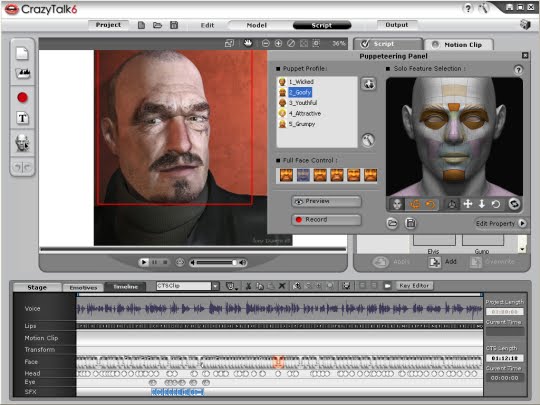
What it does: Facial animation creator software with which you can take any photo and make it speak, smile and a host of other emotions.


Pros
Cons
+ Loads of features.
-      A little hard to navigate.
+ Upload to YouTube straight from the programme.


First Impressions:
-        
     Ease of use – Easy on the whole with the option to keep it simple in basic editing and effects, but with loads of features and configurations to play with if you are feeling more confident.

-         Design – A little tough to navigate, but after a while you get the hang of.

Once installed, it was easy to start a new project either choosing my own photo, taking one with a web cam or using one from the programme itself.

Then there are a few step by step processes to crop, rotate, adjust the colour levels and mark the points which at movement will be centred around on the photo.

Once you have suitably adjusted the picture, you can make it talk through a text to speech function with the ability to adjust volume, pitch and speed; or you can record your own voice. Then you can adjust the emotion on the face and the lip sync key to make the character talk more naturally.

You can then share your creations in a full screen viewing on your computer, or upload to YouTube in HD from the programme itself.
 
What’s in the box:
-        
     CD ROM software
-         Manual


Tech Specs: Full specs here.

Conclusion: An astonishing amount of features to play with creating great animations, all at a great price for the standard version.

Feel free to ask a question or leave a comment.


Edifier OnTheGo if350 Review

Rating: 8/10

Best Price: £93.05 here.


Pros
Cons
+ Decent sound quality and radio reception.
-      Not the cheapest of docks out there
+ Built in rechargeable battery
-      Prone to scratches in areas not covered by neoprene case
+Remote and carry pouch as standard


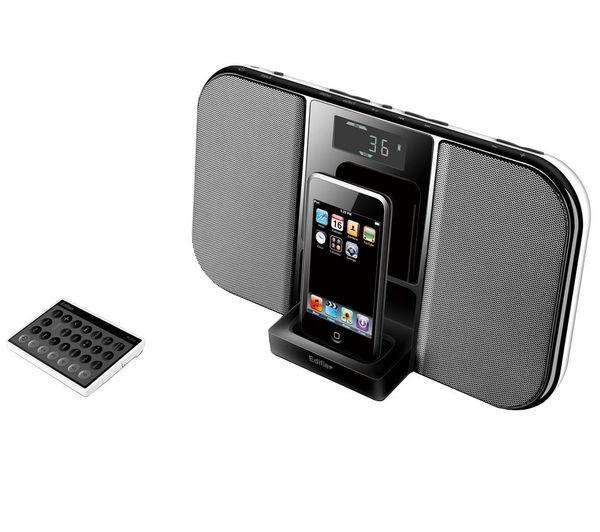
     Ease of use: Very simple and well laid out buttons on the top of the speakers. The remote has a fair few buttons; however it is also very intuitive and straightforward.

-         Design: The back of the speakers are a nice iPhone white, and black at the front. The LCD display is a little on the small side.

-         Sound quality: The Edifier has a very impressive sound quality for its size. Bass strong enough to give depth to the music and the volume goes to a good level, easily enough for a BBQ or small garden party. Here are a couple of recordings of the speakers.
     
     The dock supports itself with a flip down leg at the back released by a catch. When the leg folds down the iPod dock folds down at the front. At the back of the if35o is a line in jack and a slot in which the remote fits in.
     
     The neoprene pouch is a nice extra, but as it does not cover the entire system, over time the speakers may get scratched and bumped.
     
     The LCD is readable but gets hard to read in direct sunlight. When in standby mode the screen displays the time, in aux and iPod modes it displays the volume and battery level.
    
     The radio picked up all the main stations no problem, and it was easy to store them into one of 18 pre-sets.

What’s in the box:

-         OnTheGo Speakers
-         Remote
-         AUX Cable
-         Neoprene carry case
-         AC cable
-         Manual

Tech Specs and Features:

Features:

  • Portable speaker for iPod or iPhone.
  • Two 3-inch speaker drivers deliver smooth, clean, uncompromised audio.
  • Built-in rechargeable Li-on battery – up to 15 hours of playtime on a single charge.
  • Full function wireless remote allows navigation of iPod songs and playlists. When not required simply store in the slot within the unit.
  • Fold away dock and neoprene carry pouch.
  • FM radio with up to 18 presets.
  • Black LCD screen – displays radio station, volume and battery status.
  • Switching power supply for worldwide use.
Specifications:
  • Total power output: RMS 12W (2 x 6W)
  • Input Type: iPod / Aux / FM
  • Power supply: Full range universal 90V – 240V, 50Hz/60Hz
  • Gross weight: Approx 1.5kg
Conclusion:

On balance the IF350 is a petite yet solid portable speaker, well designed with added extras such as a carry case and remote as standard. For the price, it would be nice to have DAB on top of FM radio. However it is a nice package with lots of functions.  

Feel free to ask a question or leave a comment.